Tour Poster Maker
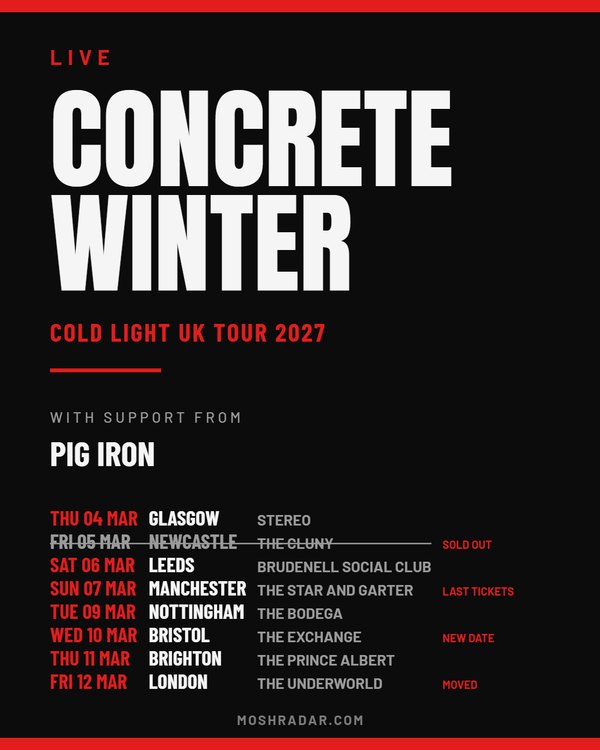
Every date of the tour on one poster. Dates, cities and venues are set in columns and sized to fit however long the run is; sold-out nights are struck through, and new, moved and nearly-gone dates are tagged. Search for your band and the dates already listed on Moshradar fill themselves in.
Making a tour poster people actually read
A tour poster is a list, and a list only works if someone can find their city in it at a glance. So the dates here are set as a table: the date in the accent colour, the city in bold, the venue smaller beside it, every row lined up. Up to ten dates sit in one column; past that they run to two, and the whole table shrinks to fit, so a thirty-date run still fits a phone screen.
Sold-out nights are struck through rather than deleted — a poster full of sold-out dates is the best advert the rest of the run gets — and any date can be tagged as new, moved or low on tickets. Re-post the same poster as the run fills up: change low to sold out and download it again.
If your dates are already listed on Moshradar, search for your band above the form and they fill themselves in, cities and venues included. Put the tour's name in as the subtitle and your support acts under "Special guests".
What size should a tour poster be?
Portrait 1080×1350 for the announcement post, a 1080×1920 story for the countdown, and the Facebook event cover for each date's event page. A long run gets the most room at portrait or story size, and A4 at 300dpi covers the copies for the merch table and the venue windows.
Making a poster that actually gets people to the show
A gig poster has one job: someone glances at it in a feed, and three things land — who's playing, where, and when. Everything else is decoration. The styles here are built around that order, so the headline act takes the space it needs and the date never ends up as small grey text nobody reads.
Not sure where to start?
Pick one of the gig poster templates — 23 starting points covering zine, neon, ticket, photo and print looks, each already sized for the place it's going. Choosing one only sets the style, size and colour, so anything you've already typed stays put. You can also browse the poster gallery to see what other bands and promoters have made.
Which size do I need?
- Portrait (1080×1350) — the default for an Instagram or Facebook feed post. Takes up the most screen space as people scroll.
- Story (1080×1920) — full-screen Instagram or Facebook stories.
- Square (1080×1080) — safe everywhere, good for a grid that needs to stay tidy.
- A4 and A5 — 300dpi print files for flyers on the merch table and posters in the venue window.
Do I need a photo?
No — every style works on type alone, and the zine style in particular is designed to look like a photocopied flyer with nothing but text. If you do add a band photo, the zine style halftones it down to black and white the way a real photocopier would.
Is it really free?
Yes. No signup to make or download a poster, and no charge to take the file away. Posters carry a small moshradar.com credit at the bottom; if you'd rather it wasn't there, a free account turns it off.
Playing a show that's already listed?
If your gig is on Moshradar, open it from the events listing and hit the poster link — the lineup, venue and date come through already filled in. Promoters running shows with us can do the same from the promoter portal.
Can I print it?
Yes — A4 and A5 come out at 300dpi, which is what a print shop asks for, and "Print PDF with bleed" wraps them in a PDF with 3mm of bleed and crop marks so the shop can trim to the edge. Tick the QR code box and the printed poster carries a "scan for tickets" code — for a gig listed here it opens the gig's page, with the ticket link on it. The Instagram sizes are screen resolution and will look soft on paper, so if the poster is going in a window, pick a print size from the start rather than scaling one up afterwards.
Posting the same gig again?
A show gets announced four or five times — on sale, the week of, the day before, last tickets, sold out. Rather than making a new poster each time, pick a stamp: it lays a sash across the corner of the poster you already have. "All sizes" downloads the feed, story, square, Facebook cover and print versions in one go, and on a phone the Share button sends the poster straight to Instagram or WhatsApp.
Can I change the fonts, colours and layout?
Yes — every style is a starting point. Open Customise and take it anywhere: set the bill left, split it under a photo or run the photo down one side; set the headline in any of 30 fonts, from blackletter to wet paint, or as a letterpress stack where every line runs the full width; give it chrome, 3D, a drop shadow or worn edges. Pick one of the curated palettes or any colour at all, turn your photo into halftone dots or a three-ink screen print, lay rays, stripes or a grid behind it, and finish with grain, worn ink, a misprint or fold marks. Click any part of the poster to change just that part, and undo anything you regret. Colours that would disappear against their background are swapped for black or white automatically, so a light accent never loses your date.
Not sure which look to go for?
Press Versions above the poster and you get twelve takes on your gig at once: every style, in different palettes, fonts, grounds and photo treatments, all with your own bill and photo. Pick one to use its look. If one is nearly right, ask for more like it and you get eleven close relatives, each with one or two things changed. Your words never change, and undo takes you straight back.
Tour dates, festival bills and set times
A gig is one date; a tour is twenty. Switch "The bill" to Tour dates for every date, city and venue in columns (the tour poster maker opens that way), to Festival tiers for a lineup set in shrinking tiers (the festival poster maker), or to Set times for a club night's running order.
Can I use our band logo?
Yes. Under "Headline lettering", pick any of the faces from the band logo maker and the headline act is set as a logo in that style — arched, outlined, shadowed or slanted if you like — and coloured to suit the poster.
Who owns the poster?
You do. Print it, sell tickets with it, post it wherever you like. You are responsible for holding the rights to any artwork or photo you upload — worth saying because a press shot usually belongs to the photographer rather than the band.
Does my artwork get uploaded?
Not unless you ask for a share link. The poster is drawn in your browser, so previews and downloads never leave your device. Getting a share link is what uploads the finished image, so it can live at its own URL for the rest of the bill to grab.
Questions
Is the gig poster maker free?
Yes — no signup to make or download a poster and no charge for the file. Posters carry a small moshradar.com credit at the bottom; a free account turns it off.
What size should a gig poster be?
Portrait 1080×1350 for an Instagram or Facebook feed post, 1080×1920 for stories, 1080×1080 square where a grid needs to stay tidy, and A4 or A5 at 300dpi for print. All of them are in the size picker above.
Do I need a photo to make a poster?
No. Every style works on type alone, and the zine style is built to look like a photocopied flyer with nothing but text.
Can I print the poster?
Yes — pick A4 or A5 and you get a 300dpi file, or a print-ready PDF with 3mm bleed and crop marks. Do not scale up an Instagram size for print; it will look soft.
Who owns the poster I make?
You do. You are responsible for the rights to any artwork you upload.
Can I change the fonts, colours and layout?
Yes. Start from any style, then use Customise for layout, 30 headline fonts, effects, palettes, photo treatments, backgrounds and print textures. Click any part of the poster to change it on its own.
Does my artwork get uploaded anywhere?
Only if you ask for a share link. Everything else is drawn in your browser and never leaves your device.